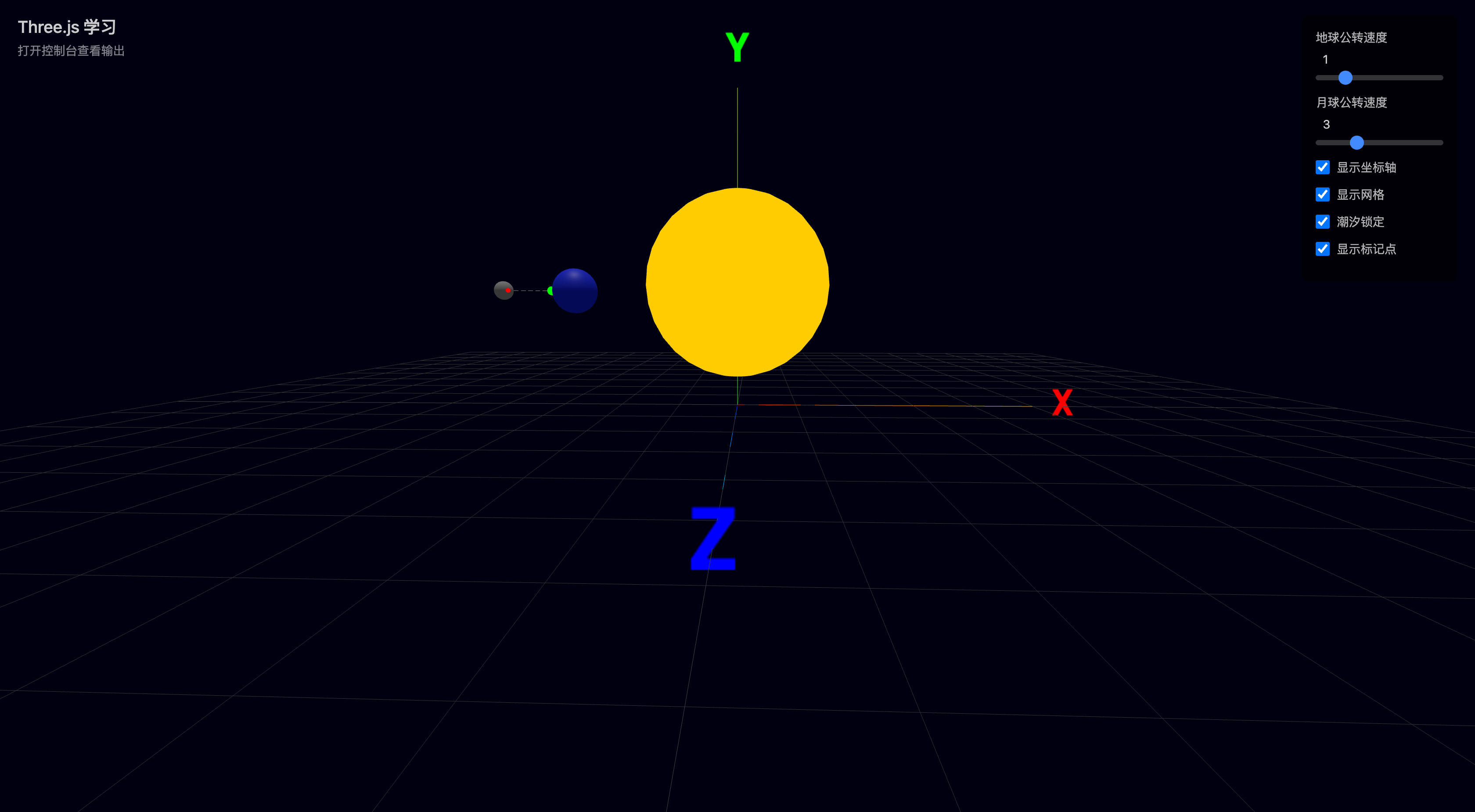
The scene graph is the skeleton system of Three.js. Understanding parent-child relationships, transform inheritance, and coordinate system conversion allows you to build complex 3D structures from simple geometry. This lesson explores the solar system model and block-based animal assembly to deeply understand the scene graph’s tree structure.
01 Learning Objectives
This lesson focuses on Three.js scene graph and transform system:
- Understand the scene graph tree structure
- Master parent-child relationships and transform inheritance
- Distinguish local versus world coordinate systems
- Learn Object3D grouping management
- Master scene.traverse() traversal
- Learn AxesHelper / GridHelper debugging
02 Scene Graph Tree Structure
What is a Scene Graph
All objects in Three.js are organized as a tree, with scene as the root node. A child object’s transform (position/rotation/scale) is relative to its parent. When the parent transforms, all children follow.
scene (root)
├── sun
│   ├── earth  ← child of sun
│   │   └── moon  ← child of earth
│   └── helper
└── lights
    ├── ambientLight
    └── directionalLight
Parent-Child Relationships and Transform Inheritance
Core rule: child’s world coordinates = parent’s world transform × child’s local transform.
/**
 * Solar system parent-child structure
 *
 * Earth is 5 units from the sun, moon is 1.5 units from earth.
 * When the sun rotates, earth and moon orbit together;
 * when earth rotates, the moon orbits around it.
 */
const sun = new THREE.Mesh(sunGeo, sunMat)
const earth = new THREE.Mesh(earthGeo, earthMat)
const moon = new THREE.Mesh(moonGeo, moonMat)

// Set relative positions (local coordinate system)
earth.position.x = 5    // 5 units from sun
moon.position.x = 1.5   // 1.5 units from earth

// Build parent-child relationships
sun.add(earth)   // earth is child of sun
earth.add(moon)  // moon is child of earth

scene.add(sun)
Key insight: the moon’s position is relative to earth, not the sun. So moon.position.x = 1.5 means 1.5 units from earth, not 6.5 from the sun.
03 Rotation Direction (Right-Hand Rule)
Three.js uses a right-handed coordinate system. Determine rotation direction with the right-hand rule:
- Thumb points along the axis’s positive direction (e.g., +Y pointing up)
- Curled fingers indicate the positive rotation direction
- Positive rotation.y = counterclockwise (looking down from above)
// Earth orbits the sun
sun.rotation.y += speed * delta  // counterclockwise (looking down from above)

// For clockwise rotation
sun.rotation.y -= speed * delta  // negative = clockwise
Common misconception:
- ❌ Thinking positive rotation.y = clockwise
- ✅ Positive rotation.y = counterclockwise (looking from +Y toward -Y)
04 Local vs World Coordinate Systems
| Coordinate System | Description | Access |
|---|---|---|
| Local | Object’s own coordinate system | object.position |
| World | Scene’s global coordinate system | object.getWorldPosition() |
// Get world position
const worldPos = new THREE.Vector3()
object.getWorldPosition(worldPos)

// Get world rotation
const worldQuat = new THREE.Quaternion()
object.getWorldQuaternion(worldQuat)
Why distinguish? When an object has a parent, object.position is relative to the parent, not the actual position in the scene. Use getWorldPosition() to get the actual scene position.
05 Object3D Grouping
Use THREE.Group to combine multiple objects into a single unit.
/**
 * Group: combine multiple objects into one unit.
 * Moving/rotating/scaling the group affects all children.
 */
const group = new THREE.Group()
group.add(mesh1)
group.add(mesh2)
group.add(mesh3)
scene.add(group)

// Move the entire group
group.position.set(1, 2, 3)

// Rotate the entire group
group.rotation.y = Math.PI / 4

// Scale the entire group
group.scale.set(2, 2, 2)
Single parent rule: an object can only have one parent. If A.add(child) is followed by B.add(child), the child is automatically removed from A and added to B.
06 scene.traverse() Traversal
traverse() is a depth-first recursive traversal — it visits all descendants (including self).
children.forEach() only visits direct children, no recursion.
/**
 * traverse — depth-first recursive traversal of all descendants.
 * Scene structure scene → A → B → C:
 *   traverse visits: scene, A, B, C
 *   forEach only visits: A
 */
scene.traverse((child) => {
  if (child instanceof THREE.Mesh) {
    child.castShadow = true
    child.receiveShadow = true
  }
})
07 AxesHelper / GridHelper Debugging
// Axis helper (red=X, green=Y, blue=Z)
const axesHelper = new THREE.AxesHelper(5)
scene.add(axesHelper)

// Grid helper
const gridHelper = new THREE.GridHelper(20, 20)
scene.add(gridHelper)
These two helpers are the most commonly used tools for debugging scene graphs. The coordinate system helps understand spatial direction, and the grid helps judge position and distance.
08 Comparison Table
| Concept | Description | Key Point |
|---|---|---|
| Local coordinates | Object’s own coordinate system | object.position |
| World coordinates | Scene’s global coordinate system | object.getWorldPosition() |
| add() | Add child object | Automatically removed from old parent |
| Group | Empty grouping container | Convenient for managing multiple objects |
| traverse() | Recursively visit all descendants | Depth-first, includes self |
| children.forEach() | Visit direct children only | No recursion |
09 API Quick Reference
| API | Purpose |
|---|---|
object.add(child) | Add child object |
object.remove(child) | Remove child object |
object.parent | Get parent object |
object.children | Get array of child objects |
object.getWorldPosition(target) | Get world coordinates |
object.getWorldQuaternion(target) | Get world rotation |
object.traverse(callback) | Traverse all descendants |
new THREE.Group() | Create empty group |
new THREE.AxesHelper(size) | Axis helper lines |
new THREE.GridHelper(size, divisions) | Grid helper lines |
10 Self-Assessment
Q1: In the solar system, if earth.position.x changes from 5 to 10, how does the moon’s position change?
The moon follows earth away from the sun, because the moon is bound to earth (moon is earth’s child). The moon’s position is relative to earth, so when earth moves, the moon follows.
Q2: Parent P at (0,0,0), child C at (3,0,0). P rotates 90° around Y axis. What are C’s world coordinates?
(0, 0, -3). When rotating 90° around Y, the X-axis direction becomes the -Z direction. C is at P’s local X=3, so world coordinates become (0, 0, -3).
Q3: After scene.add(earth) then sun.add(earth), which parent does earth end up under?
Earth ends up under sun. An object can only have one parent — the later add() “steals” the child. If the child already has a parent, it’s automatically removed from the old parent and added to the new one.
Q4: What’s the difference between scene.traverse() and scene.children.forEach()?
traverse is a depth-first recursive traversal that visits all descendants including self. With scene → A → B → C, traverse visits scene, A, B, C. forEach only visits direct children — just A.
Q5: To achieve tidal locking (moon always shows the same face to earth), what needs to change in the animation loop? How does this relate to parent-child relationships?
The parent-child relationship makes the parent’s rotation drive the child’s orbit, but the child’s self-rotation must be controlled separately. Tidal locking synchronizes the self-rotation with the orbit. Implementation: in the animation loop, set moon.rotation.y to match earth.rotation.y (opposite direction), so the moon’s self-rotation cancels the orbit-induced view change.
11 Plain English Explanation
Transform Inheritance (how parent-child relationships affect world coordinates)
Imagine you’re walking inside a moving train. Your position = the train’s position + your position inside the carriage. If the train moves 100 meters forward, you move with it without taking a step. If the train turns, you turn with it.
Three.js parent-child relationships work the same way: a child’s “position” is always relative to its parent. When the parent moves, the child follows; when the parent rotates, the child rotates. The child’s world coordinates = parent’s world transform × child’s local transform.
| Concept | Analogy | Correspondence |
|---|---|---|
| Parent | Train | Parent transform → child follows |
| Child | Passenger | Child position is relative to parent |
| Local coordinates | Passenger’s position in the carriage | object.position |
| World coordinates | Passenger’s position relative to the ground | object.getWorldPosition() |
| Transform inheritance | Train turns, passenger turns with it | Parent rotates, child follows |
12 Homework
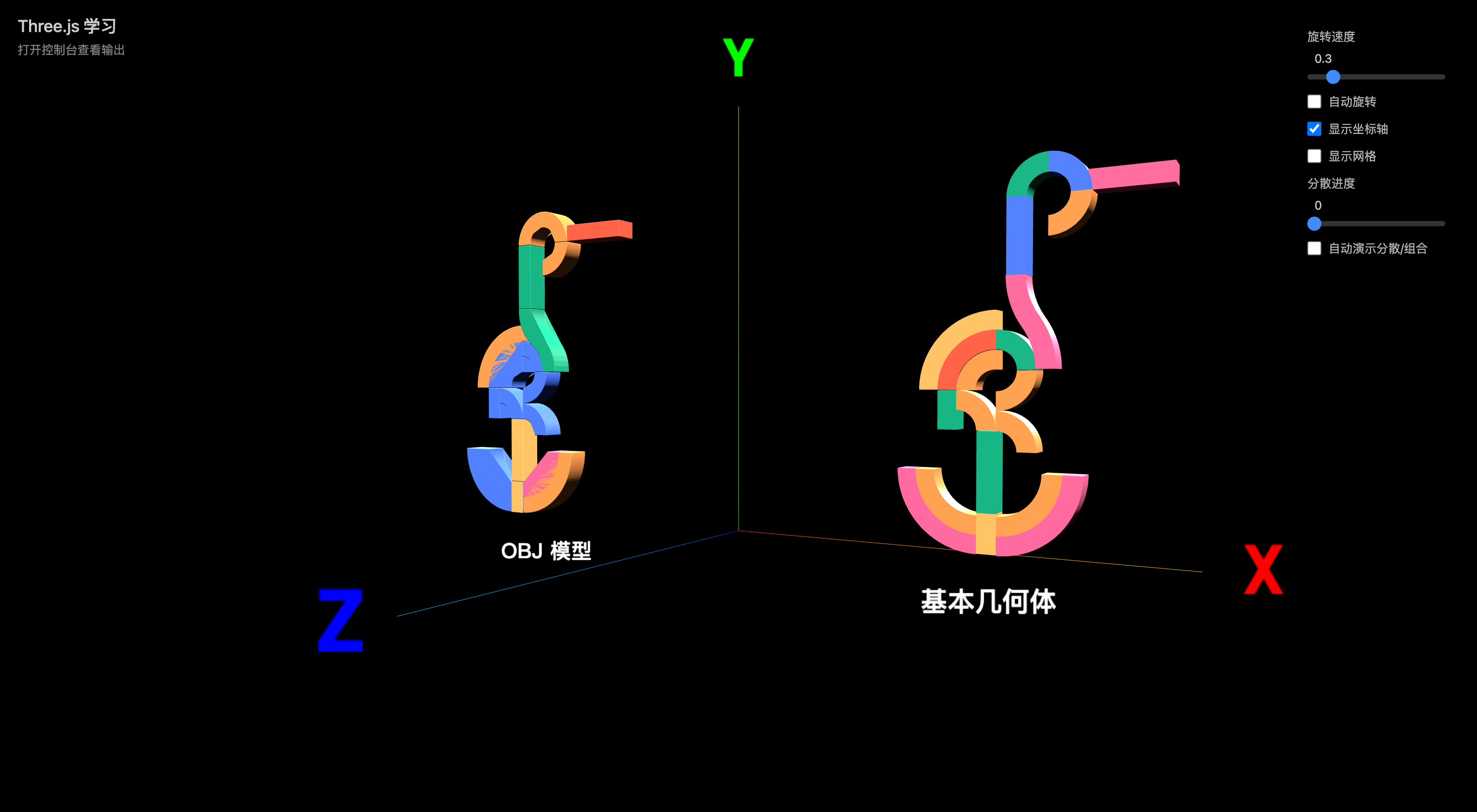
Assignment: Block-Based Animal Assembly
Goals
- Assemble a block animal using basic geometry, comparing against an OBJ model
- Demonstrate parent-child relationships and transform inheritance
- Implement part dispersion/reassembly animation
Reference Cases
| Case | Link | Award |
|---|---|---|
| Der Baukasten | https://www.awwwards.com/sites/der-baukasten | SOTD 2025-09-23, 7.22/10 |
Requirements
- Parent-child relationship implementation (30 pts) — correct animal part hierarchy
- Transform inheritance (25 pts) — parent parts drive child parts
- Dispersion/reassembly animation (20 pts) — parts spread apart and reassemble
- Interactive experience (15 pts) — control panel for rotation/dispersion
- Visual polish (10 pts) — materials, lighting, overall composition
Reference code: src/homework/07-scene-graph/main.ts
Implementation Preview
This article is note #7 in the Three.js Creation Diary learning series. Course rating: 9.8/10.