In the first 7 lessons, we created geometry with code. In real projects, 3D models are usually made in Blender/Maya, exported as GLTF/GLB, and loaded into the scene. This lesson covers the complete model loading pipeline: load → compress → scale → animate.
01 Learning Objectives
This lesson focuses on Three.js model loading system:
- Understand GLTF/GLB format differences and file structure
- Learn to use GLTFLoader to load models
- Understand Draco compression principles and configuration
- Implement LoadingManager for unified progress management
- Master model auto-scaling and centering algorithms
- Understand LOD (Level of Detail) strategy
- Learn AnimationMixer for animation playback
02 GLTF Format Details
GLTF vs GLB
| Format | Description | Use Case |
|---|---|---|
| GLTF | JSON text, resources scattered (.gltf + .bin + textures) | Development/debugging |
| GLB | Binary, single file with all resources | Production |
GLTF File Structure:
scene.gltf          # JSON main file (scene description)
scene.bin           # Binary data (vertices, indices)
texture.png         # Texture file
Why GLTF is “the JPG of 3D”:
- Open standard (maintained by Khronos Group)
- Supports PBR materials, animations, skeletons
- Small size, fast loading
- All major 3D software supports export
03 GLTFLoader Usage
Basic Loading
import { GLTFLoader } from 'three/addons/loaders/GLTFLoader.js'

/**
 * Basic model loading
 *
 * @param url - Model file path (.glb or .gltf)
 * @param callback - Loading complete callback, receives GLTF object
 */
const loader = new GLTFLoader()
loader.load('/models/suzanne.glb', (gltf) => {
  scene.add(gltf.scene)
})
GLTF Object Structure
After loading, the gltf object contains:
| Property | Type | Description |
|---|---|---|
gltf.scene | THREE.Group | Scene root node (all model data) |
gltf.animations | THREE.AnimationClip[] | Animation array |
gltf.cameras | THREE.Camera[] | Model’s own cameras |
gltf.asset | object | Metadata (generator tool, version, etc.) |
04 LoadingManager Progress Management
Unified Progress Management
/**
 * LoadingManager — Unified progress management for all loaders
 *
 * Must be passed to Loader constructor, otherwise onLoad won't trigger.
 * When multiple Loaders share the same Manager, progress is automatically aggregated.
 */
const manager = new THREE.LoadingManager()

manager.onProgress = (url, loaded, total) => {
  const progress = (loaded / total * 100).toFixed(0)
  console.log(`${progress}%`)  // "33%", "67%", "100%"
}

manager.onLoad = () => {
  console.log('All loaded')
}

// Pass to loader, progress automatically reports to manager
const loader = new GLTFLoader(manager)
Key: LoadingManager must be passed to the Loader constructor, otherwise onLoad won’t trigger.
05 Draco Compression
Principle
Google’s 3D geometry compression library, compresses vertex data through quantization, prediction, and entropy encoding, reducing file size by 90%+.
import { DRACOLoader } from 'three/addons/loaders/DRACOLoader.js'

/**
 * Draco decoder configuration
 *
 * Decoder loads from CDN, no local files needed.
 * Automatically decompresses Draco-compressed GLTF/GLB models.
 */
const dracoLoader = new DRACOLoader()
dracoLoader.setDecoderPath('https://www.gstatic.com/draco/versioned/decoders/1.5.6/')
loader.setDRACOLoader(dracoLoader)
Compression Results
| Model | Original Size | Draco Compressed | Ratio |
|---|---|---|---|
| Damaged Helmet | 4.2 MB | 0.8 MB | 81% |
| Flight Helmet | 5.1 MB | 1.2 MB | 76% |
06 Model Auto-Scaling and Centering
Problem
Models from different sources have vastly different sizes (0.01 ~ 100 units), requiring unified handling.
Algorithm
/**
 * Model auto-scaling and centering
 *
 * Steps:
 * 1. Calculate bounding box → get actual model size
 * 2. Calculate scale ratio → target size ~3 units
 * 3. Recalculate bounding box after scaling → center
 *
 * @param model - Loaded model object
 * @param targetSize - Target size (default 3)
 */
function normalizeModel(model: THREE.Object3D, targetSize = 3) {
  // 1. Calculate bounding box
  const box = new THREE.Box3().setFromObject(model)
  const size = box.getSize(new THREE.Vector3())

  // 2. Calculate scale ratio
  const maxDim = Math.max(size.x, size.y, size.z)
  const scale = targetSize / maxDim
  model.scale.setScalar(scale)

  // 3. Recalculate bounding box and center
  const newBox = new THREE.Box3().setFromObject(model)
  const newCenter = newBox.getCenter(new THREE.Vector3())
  model.position.sub(newCenter)
}
Key: After scaling, you must recalculate the bounding box before centering, because scale changes world coordinates.
07 LOD (Level of Detail)
Principle
Automatically switch between different model precisions based on distance from camera.
/**
 * LOD — Level of Detail
 *
 * Use high-precision model up close, low-precision far away.
 * Reduces rendering overhead, improves performance.
 */
const lod = new THREE.LOD()
lod.addLevel(highPoly, 0)    // 0-20m: high precision
lod.addLevel(mediumPoly, 20) // 20-50m: medium precision
lod.addLevel(lowPoly, 50)    // 50m+: low precision
scene.add(lod)
08 AnimationMixer Animation Playback
Basic Usage
/**
 * AnimationMixer — Animation mixer
 *
 * Manages all animations of a model.
 * mixer.update(delta) must be called in the animation loop.
 */
const mixer = new THREE.AnimationMixer(model)
const action = mixer.clipAction(gltf.animations[0])
action.play()

// Update in animation loop
function animate(delta: number) {
  mixer.update(delta)
}
AnimationAction Control
action.setLoop(THREE.LoopRepeat, Infinity)  // Loop
action.setLoop(THREE.LoopOnce, 1)           // Play once
action.timeScale = 2.0                       // 2x speed
action.fadeIn(0.3)                           // Fade in
action.fadeOut(0.3)                          // Fade out
action.reset()                               // Reset to start
action.stop()                                // Stop playing
09 Comparison Table
| Concept | Description | Key Point |
|---|---|---|
| GLTF | JSON text format | For development/debugging |
| GLB | Binary single file | For production |
| GLTFLoader | Model loader | loader.load(url, callback) |
| DRACOLoader | Draco decompressor | Loads decoder from CDN |
| LoadingManager | Progress manager | Must pass to Loader constructor |
| Box3 | Bounding box | setFromObject() calculates size |
| LOD | Multi-precision switch | Auto-selects model precision by distance |
| AnimationMixer | Animation mixer | mixer.update(delta) in loop |
10 API Quick Reference
| API | Purpose |
|---|---|
new GLTFLoader(manager) | Create GLTF loader |
loader.load(url, onLoad, onProgress, onError) | Load model |
loader.setDRACOLoader(dracoLoader) | Set Draco decompressor |
new DRACOLoader() | Create Draco decompressor |
dracoLoader.setDecoderPath(url) | Set decoder path |
new THREE.LoadingManager() | Create progress manager |
new THREE.Box3().setFromObject(obj) | Calculate bounding box |
box.getSize(target) | Get bounding box size |
box.getCenter(target) | Get bounding box center |
new THREE.LOD() | Create LOD object |
lod.addLevel(object, distance) | Add precision level |
new THREE.AnimationMixer(root) | Create animation mixer |
mixer.clipAction(clip) | Get animation action |
mixer.update(delta) | Update animation state |
11 Review Quiz
Q1: After loading a GLTF model, it’s only 0.03 units — invisible to the naked eye. But the same model is normal-sized in Blender. What’s the problem and how to fix?
This is a Three.js / Blender unit mismatch issue. The model looks normal in Blender but is tiny in Three.js, usually because: 1. Blender scene unit scaling — global scale applied during export; 2. Model dimensions — the model might be centimeter-level in Blender, but Blender treats 1 unit as 1 meter, Three.js loads as-is; 3. Export settings — +Y Up or unit conversion options not checked.
Solution: Use a unified scaling function. The code uses Box3.setFromObject() to calculate the bounding box, then scale = targetSize / maxDim to auto-scale to target size. Three.js itself has no “unit” concept — it only recognizes numbers, so auto-scaling must be done at the code level.
Q2: LoadingManager’s onLoad callback never triggers, but the model clearly loaded successfully (console shows model data). What’s the most likely cause? How to debug?
Most likely causes: 1. LoadingManager wasn’t passed to Loader at all — new GLTFLoader() without manager parameter means the model load isn’t registered with the manager, onLoad either triggers immediately (0 resources) or never; 2. Same LoadingManager shared by multiple loaders — onLoad waits for all registered loaders to complete; 3. Silent resource failure — failed resources without onError callback get stuck in pending state.
Debug order: Check Loader constructor for manager → Check onError → Check for stuck resources.
Q3: Draco compression reduces model files by 90%+, but loading time isn’t necessarily faster. Why? In what scenarios is Draco actually slower?
Core reason: network transfer time vs. CPU decoding time tradeoff. Key overhead sources: 1. Decoder loading — Draco decoder (WASM + JS wrapper) is ~300-600 KB, needs extra download and WASM instantiation; 2. CPU-intensive decompression — mesh decompression is pure CPU computation, WASM decoding runs single-threaded, no GPU acceleration; 3. JS fallback decoder — if WASM unavailable, JS decoder is 3-5x slower.
Draco is actually slower in: 1. Small models/low vertex count (transfer savings minimal, decoder init + decode overhead fixed); 2. Local development localhost (network bandwidth nearly infinite, download time ~0, decode overhead is pure waste); 3. Mobile/low-end devices (weak CPU, WASM decode speed drops significantly); 4. Already-compressed glTF (CDN usually has gzip/brotli, Draco’s extra savings limited); 5. Many small meshes (each mesh decoded independently, many decode calls, cumulative overhead); 6. JS decoder fallback (terrible performance in environments without WASM).
Ideal Draco scenarios: large high-precision models (hundreds of thousands of vertices), slow networks (3G/4G), desktop with sufficient CPU.
Q4: Code uses Box3.setFromObject() to calculate bounding box, scales the model, then uses Box3.setFromObject() again to recalculate before centering. Why recalculate? Can’t we just use the first center with model.position.sub(center)?
Core reason: Box3.setFromObject() returns world coordinates. Before scaling, center is the old center in world coordinates; after scaling, the model’s world range changes and the old center no longer equals the new center. Example: model geometric center at (0, 1, 0), after 2x scaling center becomes (0, 2, 0) — subtracting with old (0, 1, 0) gives wrong offset.
Alternative: centering first then scaling (swap order) is actually feasible, but the code chose “scale first then recalculate” for clarity.
Q5: LOD’s addLevel(object, distance) second parameter is distance threshold. If two levels have the same distance (both 0), how does Three.js handle it? If reversed (high-precision at 100, low-precision at 0)?
Three.js LOD internal logic: find all levels where distance <= camera distance, select the one with the largest distance. Internally sorted in ascending order by distance.
Same distance (both 0): after sorting both are 0, when camera distance >= 0 (always true), both qualify, loop selects the later one in array. Result: one level is dead code, never rendered; no errors, no flickering — equal distances with fixed traversal order means same one selected every time.
Reversed (high-precision at 100, low-precision at 0): low precision up close, high precision far away — looks terrible but won’t throw errors.
12 Plain English Explanation
LoadingManager must be passed to Loader constructor
Imagine you’re a delivery station manager (LoadingManager). Your job is to track “has all the cargo arrived?”
But the delivery driver (GLTFLoader) must know you’re their manager before delivering. If the driver doesn’t know you, they’ll just drop packages at the door and leave, never telling you “this delivery is done.”
new GLTFLoader(manager) = driver recognizes you as manager, reports each delivery.
new GLTFLoader() = driver works alone, you never get reports, never hear “all done.”
That’s why onLoad never triggers in code — the model loaded successfully, but LoadingManager didn’t know about it at all.
LoadingManager is like a commander, Loader is like workers. Workers must register with the commander when starting work — otherwise the commander doesn’t know who’s working and can’t track progress.
- Manager (commander) → GLTFLoader (Worker A) loads model files / TextureLoader (Worker B) loads textures / AudioLoader (Worker C) loads audio
- If Loader is created without Manager, it’s like a worker secretly working without reporting — Manager doesn’t know it exists, progress bar naturally won’t update.
Model Loading (from file to scene)
Imagine buying furniture online: order (load) → unpack (decompress) → assemble (parse) → place in room (add to scene).
Three.js model loading works the same way:
| Step | Furniture | Three.js |
|---|---|---|
| Order | Delivery arrives | loader.load(url) |
| Unpack | Open the box | Draco decompression (if compressed) |
| Assemble | Follow instructions | Parse GLTF data, create Mesh |
| Place | Put in the right spot | Scale, center, add to scene |
LOD is “from far it’s a mountain, up close it’s a tree” — distant objects use low-precision models (save performance), nearby objects use high-precision models (show details). Just like game buildings in the distance, high-res textures only load when you get close. Two levels at the same distance become dead code; reversed means far is sharp, near is blurry.
13 Homework
Assignment: My 3D Room
Objectives
- Use GLTF model loading to build a scene
- Comprehensively apply model loading, materials, lighting, shadows, animation from lessons 1-8
- Reference Bruno Simon’s my-room-in-3d project
Reference Cases
| Case | Link | Description |
|---|---|---|
| my-room-in-3d | https://github.com/brunosimon/my-room-in-3d | Bruno Simon’s 3D room project |
Requirements
- Model loading & display (30 pts) — GLTFLoader + auto-scaling and centering
- Materials & lighting (25 pts) — PBR materials + three-point lighting + shadows
- Scene building (25 pts) — Multi-model composition, reasonable spatial layout
- Interaction experience (20 pts) — OrbitControls navigation + control panel
Reference code: src/homework/08-model-loading/main.ts
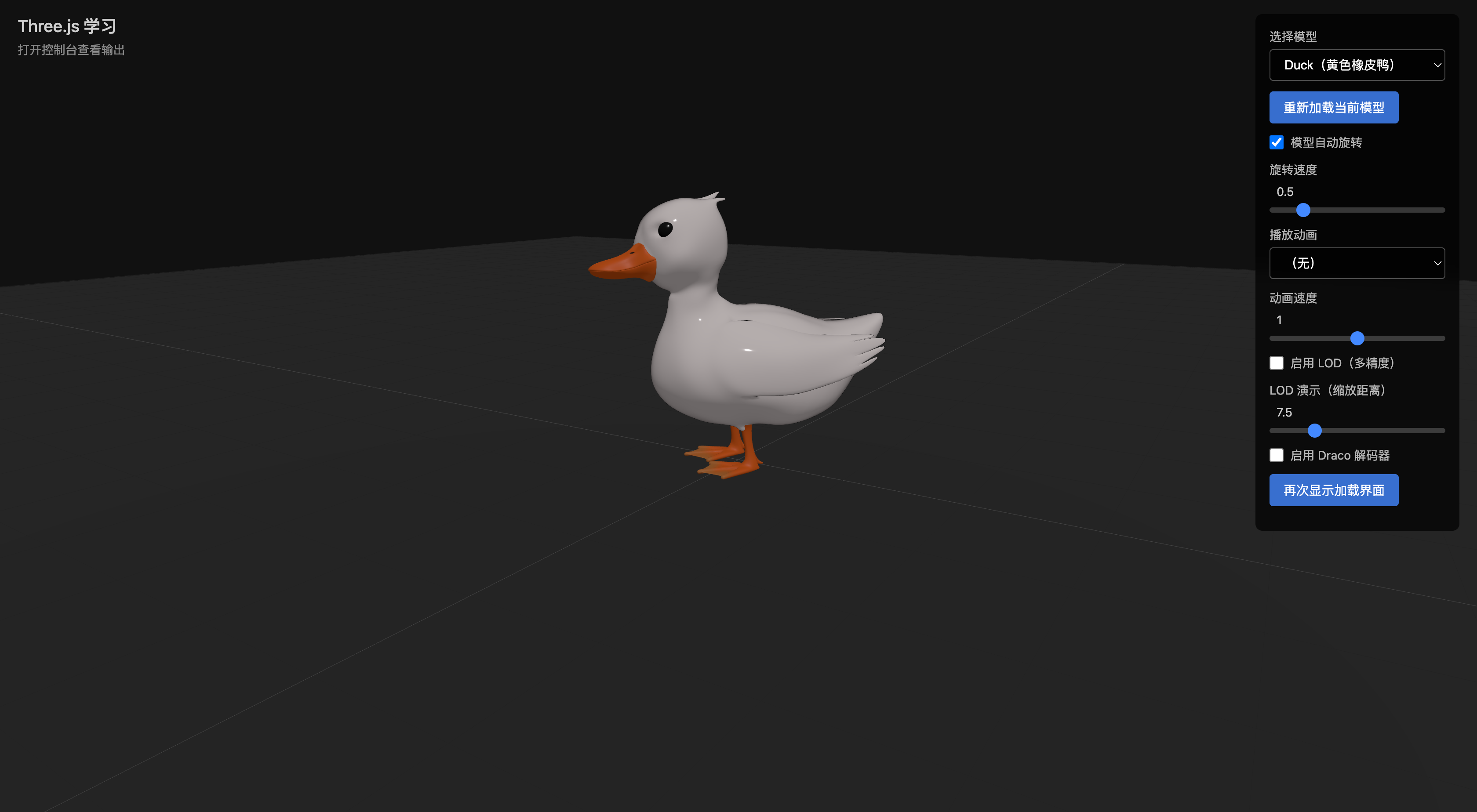
Implementation Preview

This is the 8th article in the Three.js Creation Diary learning series. Course rating: 9.2/10.