In the first 8 lessons, all animations were manually written in the requestAnimationFrame loop. This lesson introduces GSAP tweening and Three.js native keyframe system for more elegant and powerful animation control.
01 Learning Objectives
This lesson focuses on Three.js animation system:
- Understand requestAnimationFrame loop vs GSAP animation differences
- Master gsap.to() / gsap.from() / gsap.timeline()
- Learn to use GSAP for smooth camera and object movement
- Master AnimationMixer for model animation playback
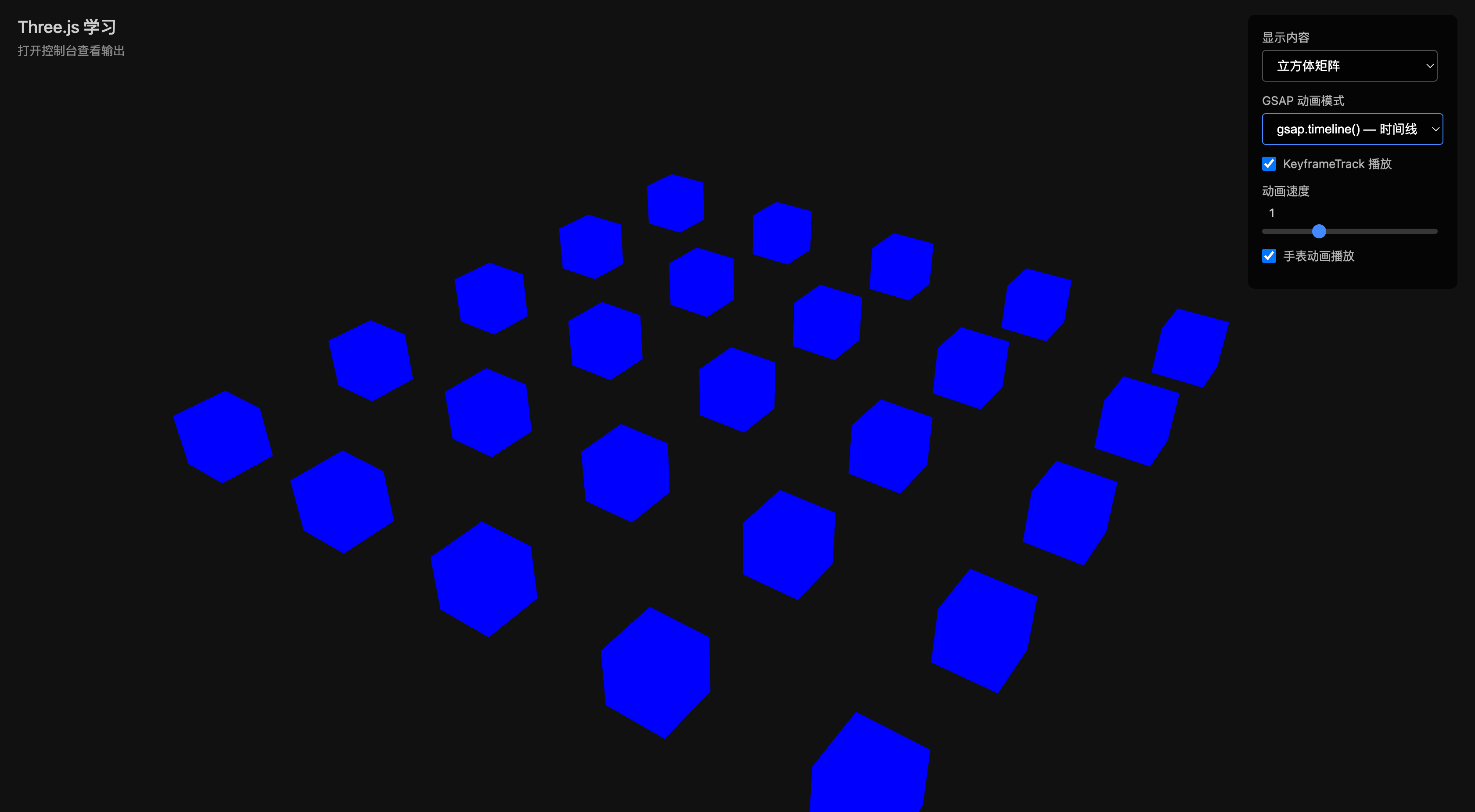
- Learn keyframe animation (KeyframeTrack / AnimationClip)
- Understand AnimationObjectGroup for shared animation across multiple objects
02 requestAnimationFrame vs GSAP
| Feature | requestAnimationFrame | GSAP |
|---|---|---|
| Purpose | Per-frame logic (physics, LOD, rendering) | Tweening (smooth transitions) |
| Control | Manual delta, progress management | Auto interpolation, easing curves |
| Easing | Must implement yourself | 30+ built-in easing functions |
| Sequencing | Must orchestrate yourself | timeline in one line |
| Performance | Optimal | Excellent (auto-optimized) |
Both can be used simultaneously: rAF for render loop, GSAP for animation control.
03 gsap.to() — Tweening
import gsap from 'gsap'

/**
 * gsap.to() — Animate from current state to target state
 * Most commonly used animation method
 */
gsap.to(cube.position, {
  x: 3,
  duration: 1.5,
  ease: 'power2.inOut',
  repeat: -1,    // Infinite repeat
  yoyo: true,    // Play back and forth
})
04 gsap.from() — Entry Animation
/**
 * gsap.from() — Animate from specified state to current state
 * Good for entry animations
 *
 * Note: from() applies initial values immediately (immediateRender: true)
 */
gsap.from(cube.scale, {
  x: 0, y: 0, z: 0,
  duration: 1.5,
  ease: 'elastic.out(1, 0.3)',  // Elastic bounce
})
05 gsap.timeline() — Timeline
/**
 * gsap.timeline() — Orchestrate multiple animations on a timeline
 *
 * Position parameters (third argument):
 * - Absolute: 1 (at 1 second)
 * - Relative: "+=" after previous / "-=" before previous ends
 * - "<" start with previous
 */
const tl = gsap.timeline({
  defaults: { duration: 0.8, ease: 'power2.out' },
  repeat: -1,
  yoyo: true,
})

tl.to(group.position, { y: 2 })
  .to(group.rotation, { y: Math.PI }, '<')
  .to(group.scale, { x: 1.2, y: 1.2, z: 1.2 }, '-=0.4')
06 KeyframeTrack Keyframe Animation
Four Track Types
// Position keyframe (VectorKeyframeTrack)
// Origin → top-right → bottom-left → back to origin
const positionKF = new THREE.VectorKeyframeTrack(
  '.position',
  [0, 1, 2, 3],
  [
    0, 0, 0,       // t=0: origin
    5, 5, 0,       // t=1: top-right
    -5, -3, 0,     // t=2: bottom-left
    0, 0, 0,       // t=3: back to origin
  ],
)

// Rotation keyframe (quaternion): 0° → 180° → 0°
const xAxis = new THREE.Vector3(1, 0, 0)
const qInitial = new THREE.Quaternion().setFromAxisAngle(xAxis, 0)
const qFinal = new THREE.Quaternion().setFromAxisAngle(xAxis, Math.PI)

const quaternionKF = new THREE.QuaternionKeyframeTrack(
  '.quaternion',
  [0, 1, 2],
  [
    qInitial.x, qInitial.y, qInitial.z, qInitial.w,
    qFinal.x, qFinal.y, qFinal.z, qFinal.w,
    qInitial.x, qInitial.y, qInitial.z, qInitial.w,
  ],
)

// Color keyframe (discrete): red → green → blue, instant switch
const colorKF = new THREE.ColorKeyframeTrack(
  '.material.color',
  [0, 1, 2],
  [1, 0, 0, 0, 1, 0, 0, 0, 1],
  THREE.InterpolateDiscrete,
)

// Opacity keyframe (linear): 1 → 0 → 1, smooth transition
const opacityKF = new THREE.NumberKeyframeTrack(
  '.material.opacity',
  [0, 1, 2],
  [1, 0, 1],
)

// Combine into AnimationClip
const clip = new THREE.AnimationClip('myAnimation', 3, [
  positionKF,
  quaternionKF,
  colorKF,
  opacityKF,
])

// Play with AnimationMixer
const mixer = new THREE.AnimationMixer(cube)
const action = mixer.clipAction(clip)
action.play()
Interpolation Modes:
| Interpolation | Effect | Use Case |
|---|---|---|
InterpolateLinear (default) | Smooth transition | Position, opacity |
InterpolateDiscrete | Instant switch | Color, discrete states |
InterpolateSmooth | Smooth curve | More natural transitions |
07 AnimationObjectGroup Shared Animation
/**
 * AnimationObjectGroup — Share animation state across multiple objects
 *
 * Core value: keyframe evaluation happens once, results broadcast to all objects.
 * The more objects, the greater the "broadcast" advantage over "repeated evaluation".
 */
const animationGroup = new THREE.AnimationObjectGroup()

for (let i = 0; i < 5; i++) {
  for (let j = 0; j < 5; j++) {
    const mesh = new THREE.Mesh(geometry, material)
    scene.add(mesh)
    animationGroup.add(mesh)  // Join shared group
  }
}

// Mixer binds to group, not individual mesh
const mixer = new THREE.AnimationMixer(animationGroup)
08 AnimationMixer Model Animation
/**
 * AnimationMixer — Play model's built-in animations
 */
async function loadAnimatedModel(scene: THREE.Scene) {
  const loader = new GLTFLoader()
  const gltf = await loader.loadAsync('/models/watch/diegoWatchAnimation4.gltf')
  const model = gltf.scene

  // Auto scale and center
  const box = new THREE.Box3().setFromObject(model)
  const maxDim = Math.max(box.getSize().x, box.getSize().y, box.getSize().z)
  model.scale.setScalar(10 / maxDim)

  scene.add(model)

  if (gltf.animations.length > 0) {
    const mixer = new THREE.AnimationMixer(model)
    const action = mixer.clipAction(gltf.animations[0])
    action.setLoop(THREE.LoopRepeat, Infinity)
    action.play()
    return { mixer, model }
  }

  return { mixer: null, model }
}
AnimationAction Control Methods:
| Method | Effect | Description |
|---|---|---|
play() | Play | Continue from current position |
pause() | Pause | Stay at current position |
stop() | Stop | Reset to initial state |
reset() | Reset | Go back to frame 0 |
resetToLoopStart() | Reset to loop start | Go back to current loop’s start |
Loop Modes:
| Mode | Effect | Description |
|---|---|---|
THREE.LoopOnce | Play once | Stop at last frame |
THREE.LoopRepeat | Loop | Restart from beginning |
THREE.LoopPingPong | Ping-pong | Play then reverse |
action.setLoop(THREE.LoopRepeat, Infinity)  // Infinite loop
action.setLoop(THREE.LoopOnce, 1)           // Play once
action.setLoop(THREE.LoopPingPong, 3)       // Ping-pong 3 times
Time Scale (timeScale):
mixer.timeScale = 0    // Pause
mixer.timeScale = 1    // Resume
mixer.timeScale = 0.5  // Slow motion (0.5x)
mixer.timeScale = 2    // Fast forward (2x)
mixer.timeScale = -1   // Reverse
Weight:
action.weight = 0.5  // 50% blend

// Multi-animation blend
const walkAction = mixer.clipAction(walkClip)
const runAction = mixer.clipAction(runClip)
walkAction.weight = 0.7  // 70% walk
runAction.weight = 0.3   // 30% run
walkAction.play()
runAction.play()
Animation Events:
// Listen for animation complete
action.getMixer().addEventListener('finished', (event) => {
  console.log('Animation finished:', event.action.getClip().name)
})

// Listen for loop complete
action.getMixer().addEventListener('loop', (event) => {
  console.log('Loop complete:', event.action.getClip().name)
})
BlendMode:
| Mode | Effect | Use Case |
|---|---|---|
NormalAnimationBlendMode (default) | Override | Single animation |
AdditiveAnimationBlendMode | Layered offset | Multi-animation combo (walk+wave) |
const clip1 = new THREE.AnimationClip('walk', 2, [walkTrack])
const clip2 = new THREE.AnimationClip('wave', 1, [waveTrack], THREE.AdditiveAnimationBlendMode)
09 GSAP Easing Functions
| Easing | Effect | Use Case |
|---|---|---|
"power1.out" | Default, smooth deceleration | General |
"power2.inOut" | Smooth acceleration/deceleration | Movement transitions |
"back.out(1.7)" | Overshoot | Entry animation |
"bounce.out" | Bounce | Landing effect |
"elastic.out(1, 0.3)" | Elastic | Emphasis |
"none" | Linear | Constant rotation |
10 Comparison Table
| BlendMode | Animation blend mode | Normal (override) / Additive (layered) |
| Concept | Description | Key Point |
|---|---|---|
| gsap.to() | Tween | From current to target |
| gsap.from() | Entry animation | From specified to current |
| gsap.timeline() | Timeline | Orchestrate multiple animations |
| KeyframeTrack | Keyframe | Manually define time + values |
| AnimationClip | Animation clip | Contains multiple tracks |
| AnimationObjectGroup | Shared animation group | Broadcast same animation to multiple objects |
| AnimationMixer | Animation mixer | Play AnimationClip |
| InterpolateDiscrete | Discrete interpolation | Color instant switch |
| InterpolateLinear | Linear interpolation | Value smooth transition |
11 API Quick Reference
11 Code Implementation
GSAP Animation Control
let currentAnim: gsap.core.Tween | null = null
currentAnim = gsap.to(cube.position, { x: 3, duration: 1 })

currentAnim.pause()
currentAnim.play()
currentAnim.reverse()
currentAnim.kill()
Reset Animation State
function killCurrent() {
  if (currentAnim) {
    currentAnim.kill()
    currentAnim = null
  }
  cube.position.set(-3, 0.5, 0)
  cube.rotation.set(0, 0, 0)
  cube.scale.set(1, 1, 1)
}
12 API Quick Reference
| API | Purpose |
|---|---|
gsap.to(target, vars) | Tween animation |
gsap.from(target, vars) | Entry animation |
gsap.timeline(vars) | Timeline |
new THREE.QuaternionKeyframeTrack(path, times, values) | Rotation keyframe |
new THREE.ColorKeyframeTrack(path, times, values, interpolation) | Color keyframe |
new THREE.NumberKeyframeTrack(path, times, values) | Number keyframe |
new THREE.AnimationClip(name, duration, tracks) | Animation clip |
new THREE.AnimationObjectGroup() | Shared animation group |
new THREE.AnimationMixer(root) | Animation mixer |
mixer.clipAction(clip) | Get animation action |
mixer.update(delta) | Update animation state |
12 Review Quiz
Q1: ColorKeyframeTrack uses InterpolateDiscrete while NumberKeyframeTrack uses InterpolateLinear. What happens if color also uses linear interpolation?
The cube would smoothly gradient through intermediate colors, like a breathing light. Discrete interpolation switches colors instantly, like a traffic light. Why does the official example use discrete for color? The question itself lacks technical depth — the distinction between interpolation modes is what matters.
Q2: AnimationObjectGroup lets 25 cubes share one AnimationMixer. What’s the performance difference vs individual Mixers?
Shared: 1 evaluation + 25 property writes per frame. Individual: 25 evaluations + 25 property writes. The difference becomes significant with many objects, dense keyframes, multiple tracks, or on mobile. Core value: evaluate once, broadcast to all.
Q3: If GSAP and KeyframeTrack both control the same property (e.g., rotation.y), what happens?
Visual flickering/jittering: two values alternate each frame. One completely suppressed: the later-executing one always overwrites. The code avoids this by having GSAP control the group and KeyframeTrack control individual cubes — different levels in the scene graph.
Q4: NormalAnimationBlendMode vs AdditiveAnimationBlendMode for “walking” + “waving” animations?
Normal (override): two animations fight for the same bones, only one wins. Additive (叠加): animations calculate offsets and combine. Result: character walks and waves simultaneously. Lower body only affected by walking, right arm affected by both.
Q5: What problems arise from using fixed delta (0.016) instead of real deltaTime?
Animation speed becomes inaccurate when frame rate fluctuates. In multiplayer sync, audio-video sync, physics simulation, or recording/playback scenarios, this becomes unacceptable. Clock.getDelta() is the standard solution.
13 Plain English Explanation
GSAP Animation vs requestAnimationFrame
requestAnimationFrame is like driving yourself — you need to calculate speed, route, and braking for every pedal press (every frame update). GSAP is like autopilot — you just tell it “where to go” and “how long to take,” and it calculates the route, speed, and smooth stop.
Both can be used simultaneously: rAF for the render loop (things that must happen every frame: rendering, physics, LOD), GSAP for animation control (smooth transitions, entry effects, timeline orchestration).
Additive Animation BlendMode
Normal mode is like replacement: you tell the actor “pose like this,” the actor does it directly, the previous pose disappears.
Additive mode is like layering: you tell the actor “on top of the current pose, raise your right hand a bit more,” the actor keeps the current pose and only adds a small change to the right hand.
Another way to understand it:
- Normal mode (override): directly replaces the image. You take a photo of a standing person, then take a photo of a sitting person — the second photo completely covers the first, you can only see sitting.
- Additive mode (layering): like two transparent films stacked together. One film shows “standing person,” another shows “raising hand,” stacked together becomes “standing and raising hand.”
If both are Normal, playing simultaneously → bones are fought over by two animations, causing jitter. One Normal + one Additive → walking determines the full body pose, waving is layered on the right arm, character walks and waves.
AnimationObjectGroup’s “Broadcast” Mechanism
Imagine a dance teacher teaching 25 students.
- AnimationObjectGroup way: teacher demonstrates once, 25 students follow simultaneously. Cost: 1 demonstration + 25 imitations.
- Individual Mixer way: teacher teaches each student separately. Cost: 25 demonstrations + 25 imitations.
The more students, the greater the “broadcast” advantage. This is the core value of AnimationObjectGroup.
This is the 9th article in the Three.js Creation Diary learning series. Course rating: 9.8/10.