HTML-in-Canvas is a Web standard proposal incubated at WICG by the Chrome team — turning
<canvas>children from “invisible fallback content” into “layoutable, drawable, interactive offscreen HTML layers.” This means DOM becomes a first-class citizen of the GPU rendering pipeline for the first time.
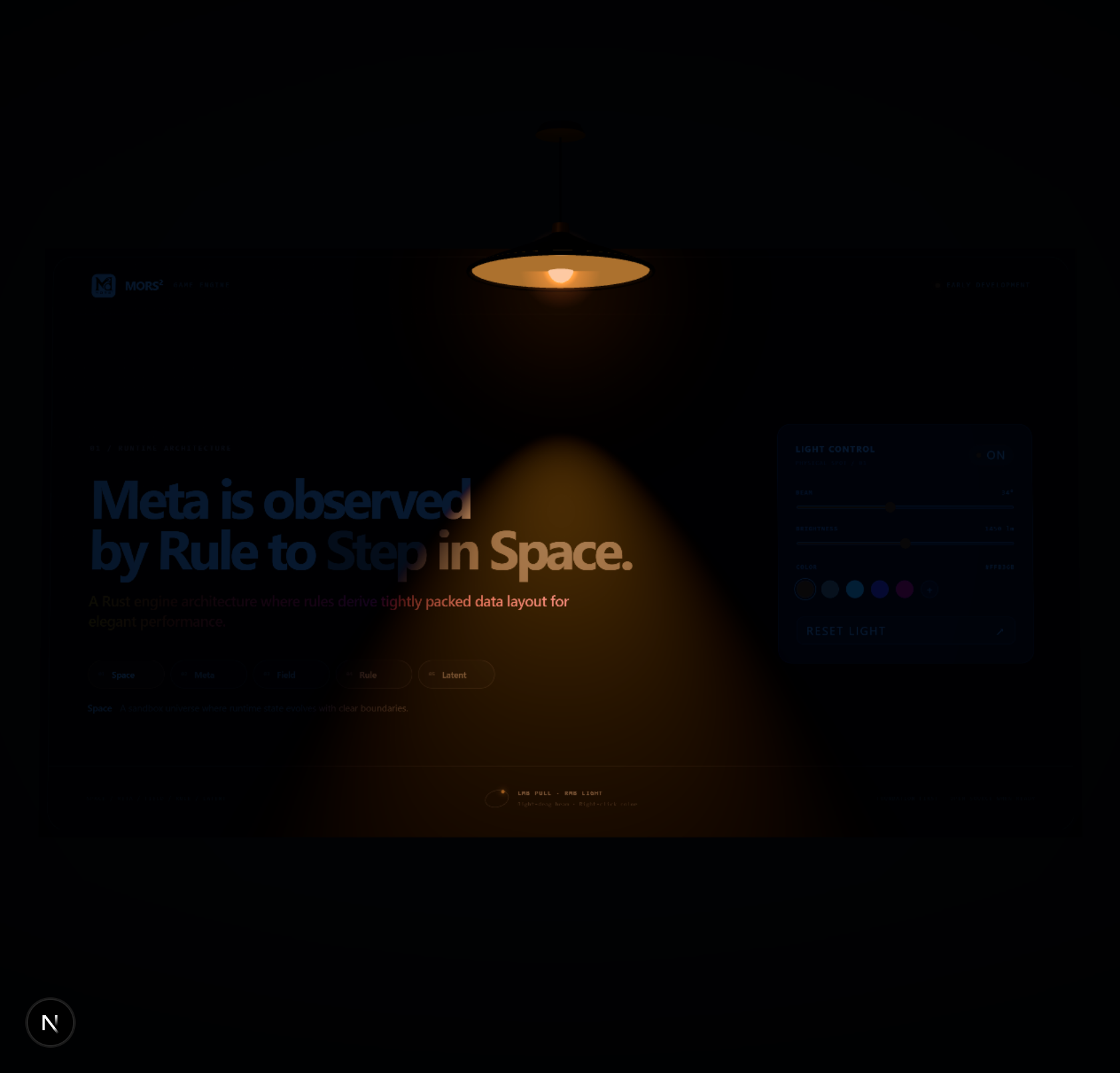
MORS² lamp experiment — a real HTML page as a Three.js texture, illuminated by a spotlight and swinging with Verlet physics
01 Proposal Background
What is it?
The core problem HTML-in-Canvas solves: render real HTML elements inside Canvas (2D or WebGL/WebGPU), and those elements are “alive” — typeable, interactive, accessible.
Before this, developers had to resort to various workarounds:
| Approach | How it works | Limitations |
|---|---|---|
html2canvas | Traverses DOM and draws manually | Poor fidelity, no interaction, slow |
SVG foreignObject | Renders via SVG then rasterizes | Many cross-origin restrictions, no interaction, single snapshot |
| DOM overlay | Absolutely positioned DOM on top of Canvas | No perspective/distortion/shader in 3D scenes |
HTML-in-Canvas takes a completely different approach: let canvas children themselves participate in layout and rendering, and the browser draws them directly into the canvas.
Proposal Status
| Info | Content |
|---|---|
| Proposal repo | WICG/html-in-canvas |
| Chrome announcement | Origin Trial blog post |
| Community docs | html-in-canvas.dev |
| Origin Trial | Chrome 148–150 |
| How to try | Chrome Canary 149+, enable chrome://flags/#canvas-draw-element |
| Standardization stage | Explainer / developer trial |
| Other browsers | Firefox and Safari have not announced implementation plans |
02 Three Core Primitives
The HTML-in-Canvas API is very streamlined — just three core concepts:
| Primitive | Belongs to | Purpose |
|---|---|---|
layoutsubtree attribute | <canvas> element | Makes children participate in layout and hit testing, but not visible directly |
drawElementImage() / texElementImage2D() / copyElementImageToTexture() | 2D / WebGL / WebGPU context | Draws child element into canvas or uploads as texture |
paint event | <canvas> element | Fires when child element rendering changes — the entry point for all drawing |
Two additional capabilities:
requestPaint()— force a paint cyclecaptureElementImage()— creates a transferableElementImagesnapshot for Worker use
03 Three-Step Workflow
Step 1 Declare         Step 2 Draw             Step 3 Sync
<canvas layoutsubtree>  canvas.onpaint = () => {    form.style.transform =
  <form id="form">        t = ctx.drawElementImage(    t.toString();
    ...                   form, 0, 0);               // hit testing / a11y
  </form>                 }
</canvas>
Step 3 is the most often overlooked: browser event dispatch, accessibility, and IntersectionObserver all depend on the element’s DOM position. The DOMMatrix returned by drawElementImage() must be written back to element.style.transform, otherwise click positions will be misaligned.
Minimal Runnable Example
<canvas id="canvas" style="width:400px; height:200px;" layoutsubtree>
  <form id="form_element">
    <label for="name">Name:</label>
    <input id="name" type="text">
  </form>
</canvas>
<script>
  const canvas = document.getElementById('canvas');
  const ctx = canvas.getContext('2d');

  canvas.onpaint = () => {
    ctx.reset();
    // Draw HTML into Canvas, get sync matrix
    const transform = ctx.drawElementImage(form_element, 0, 0);
    // Sync DOM position for clicks/input/a11y
    form_element.style.transform = transform.toString();
  };

  // Align canvas grid to device pixel ratio for sharp text
  new ResizeObserver(([entry]) => {
    canvas.width  = entry.devicePixelContentBoxSize[0].inlineSize;
    canvas.height = entry.devicePixelContentBoxSize[0].blockSize;
  }).observe(canvas, { box: 'device-pixel-content-box' });

  canvas.requestPaint(); // trigger first frame
</script>
When you run this, you’ll see a truly typeable <input> rendered inside Canvas — this is the fundamental difference from screenshot approaches.
drawElementImage Overloads
Fully isomorphic with drawImage():
| Signature | Description |
|---|---|
(el, dx, dy) | Draw at (dx, dy), auto-scale to screen ratio |
(el, dx, dy, dw, dh) | Draw and scale to target size |
(el, sx, sy, sw, sh, dx, dy) | Draw a sub-rectangle of the source element |
(el, sx, sy, sw, sh, dx, dy, dw, dh) | Source sub-rect scaled to target rect |
Return value is always DOMMatrix (for Step 3 sync).
04 Advanced Usage
Animation: requestPaint
paint only fires when child element rendering changes. For continuous animation (e.g., rotating an HTML label), request repaints actively:
canvas.onpaint = (e) => {
  ctx.reset();
  ctx.save();
  ctx.translate(200, 100);
  ctx.rotate(theta);            // Canvas CTM affects drawing; CSS transform does not
  const t = ctx.drawElementImage(el, -el.offsetWidth / 2, -el.offsetHeight / 2);
  el.style.transform = t.toString();
  ctx.restore();
  theta += 0.01;
  canvas.requestPaint();        // chain-trigger next frame
};
canvas.requestPaint();          // start
WebGL Texture Upload
const gl = canvas.getContext('webgl');
const tex = gl.createTexture();

canvas.onpaint = () => {
  gl.bindTexture(gl.TEXTURE_2D, tex);
  gl.texElementImage2D(gl.TEXTURE_2D, 0, gl.RGBA, gl.RGBA, gl.UNSIGNED_BYTE, form_element);
  gl.texParameteri(gl.TEXTURE_2D, gl.TEXTURE_MIN_FILTER, gl.LINEAR);
};
Then use tex like any texture: map it onto cubes, planes, or even process with custom shaders (CRT filters, refraction, distortion).
WebGPU Texture Upload
canvas.onpaint = () => {
  device.queue.copyElementImageToTexture(element, { texture: gpuTexture });
};
Worker + OffscreenCanvas Rendering
Key insight: ElementImage is a Transferable object that can be transferred to a Worker with zero copy.
// Main thread
canvas.onpaint = () => {
  const img = canvas.captureElementImage(form_element);   // snapshot
  worker.postMessage({ elementImage: img }, [img]);        // transfer to Worker
};
worker.onmessage = ({ data }) => {
  form_element.style.transform = data.transform.toString(); // sync back to DOM
};

// Inside Worker
self.onmessage = (e) => {
  if (e.data.elementImage) {
    octx.reset();
    const t = octx.drawElementImage(e.data.elementImage, 100, 0);
    self.postMessage({ transform: t });
  }
};
Ideal for large visualization dashboards, game UIs, and other main-thread-sensitive scenarios.
05 Framework / Engine Integration
Major 3D engines are already on board:
| Framework | API | Docs |
|---|---|---|
| Three.js | THREE.HTMLTexture | Official docs (experimental) |
| PlayCanvas | pc.Texture + setSource(htmlElement) | PlayCanvas guide |
| PixiJS | rendering.HTMLSource | PixiJS docs |
| Babylon.js | DynamicTexture / HTML Texture | Babylon.js guide |
| Remotion | <HtmlInCanvas> component | Remotion docs |
| CanvasUI | Component library (React/Vue/Solid/vanilla) | canvasui.dev |
Three.js example:
const material = new THREE.MeshBasicMaterial();
material.map = new THREE.HTMLTexture(uiElement);   // pass DOM element
const mesh = new THREE.Mesh(new THREE.BoxGeometry(1, 1, 1), material);
scene.add(mesh);
06 Pros and Cons
Advantages
| Capability | Description |
|---|---|
| Native rendering fidelity | Browser layout engine output: ligatures, RTL, subpixel rendering, complex wrapping — all correct |
| Built-in accessibility | Drawn elements are the fallback content itself — a11y tree and screen content naturally match |
| Full interaction preserved | Form input, text selection, copy/paste, context menus, find-in-page all work even on 3D textures |
| Unified API across contexts | One API covers 2D / WebGL / WebGPU |
| Worker rendering | ElementImage is transferable — large UIs can render in OffscreenCanvas + Worker |
| DevTools debuggable | Inspect in-canvas elements directly in the Elements panel; CSS changes reflect instantly on 3D textures |
| Indexable / translatable | Crawlers and AI agents can read text in 3D scenes; browser translation works |
| Ecosystem already active | Three.js, PlayCanvas, PixiJS, Babylon.js all support it |
Disadvantages and Limitations
| Limitation | Impact |
|---|---|
| Chromium-only | Firefox/Safari haven’t committed; cross-browser projects need polyfill or fallback |
| Experimental stage | API signatures and behavior details may still change — high follow-up cost |
| Manual transform sync | Especially in 3D scenes, converting MVP matrix to CSS transform is mathematically involved |
| Scroll performance model | In-canvas scrolling is JS-driven — large lists perform worse than native DOM scrolling |
| Cross-origin restrictions | Cross-domain iframes / media cannot be drawn |
| Breaks mental models | Rules like “CSS transform doesn’t participate in drawing” counter intuition |
07 Cross-Browser Strategy: Polyfill
three-html-render implements the full WICG API surface: uses the fast native texElementImage2D path when available, otherwise falls back to SVG foreignObject rasterization — covering Safari/Firefox/iOS.
Detecting native support:
const nativeSupported = typeof HTMLCanvasElement.prototype.drawElementImage === 'function'
  || typeof WebGLRenderingContext.prototype.texElementImage2D === 'function';
Three.js integration:
<script type="importmap">
{ "imports": {
    "three": "https://cdn.jsdelivr.net/npm/three@0.170.0/build/three.module.js",
    "three-html-render/polyfill": "https://cdn.jsdelivr.net/npm/three-html-render/dist/polyfill.mjs",
    "three-html-render/renderer": "https://cdn.jsdelivr.net/npm/three-html-render/dist/renderer.js"
}}
</script>
<script type="module">
  import { installHtmlInCanvasPolyfill } from 'three-html-render/polyfill';
  import { ThreeHTMLRenderer } from 'three-html-render/renderer';
  installHtmlInCanvasPolyfill();           // auto-uses native if available

  const htmlRenderer = new ThreeHTMLRenderer();
  htmlRenderer.connect(canvas, camera, threeRenderer);
  htmlRenderer.addObject(document.getElementById('ui'), mesh);
  // Each frame: htmlRenderer.update() — texture upload + DOM overlay + event dispatch
</script>
08 Pitfall Checklist
- Experimental API: Chrome 148–150 is in Origin Trial — implementation details may change. Don’t use for critical production paths.
- Direct child constraint:
drawElementImage()target must be a direct child of<canvas>, and cannot bedisplay: none. - Source element’s CSS transform is ignored: Only the canvas’s own CTM applies during drawing; transform only affects hit testing. Move elements using canvas coordinates instead.
- Overflow clipping: Both layout overflow and ink overflow are clipped to the element’s border box — shadows get cut off.
- DOM changes in paint event take effect next frame: Draw with
ctxfirst (visible this frame), then modify DOM (next frame snapshot). - Paint fires in reverse tree order with multiple canvases: Descendants before ancestors — watch for this with nested canvases.
- Snapshot timing: Calling
drawElementImage()outside paint uses the previous frame’s snapshot; calling before the first snapshot throws an exception. - Cross-origin content not drawable: Cross-domain iframes, visited link styles, autofill content, spell-check marks won’t render for privacy.
- Scrolling and animation can’t be independent of JS: Canvas content is JS-driven — scrolling can’t be handled by the compositor thread like native DOM.
- DPR handling is mandatory: Canvas grid must align with
devicePixelContentBoxSizeor text will be blurry. texElementImage2Drecommended withLINEARfiltering: For smooth text rendering.
09 Homework: Suspended Spotlight 3D Scene
Goal: Build an interactive 3D “spotlight illuminating an HTML surface” scene, on par with the new html-in-canvas-light demo in AwardWebsites: HTML-in-Canvas rendering + Three.js 3D + Verlet pendulum physics + full mouse interaction.
Reference Implementation
A complete, runnable reference implementation already exists in this project at AwardWebsites — src/demos/html-in-canvas-light (a re-creation of the HTML-Light-Demo / MORS² suspended spotlight experiment). Its structure maps cleanly from “init” to “runtime” onto the three-step workflow covered earlier — the ideal template for this assignment:
| Source File | Responsibility | Theory Mapped To |
|---|---|---|
index.tsx | Scene setup, Verlet physics, mouse interaction, lighting sync | 03 Three-Step Workflow / 04 Advanced Usage |
page-surface.tsx | The HTML surface hanging under the lamp (interactive control panel) | 02 Three Core Primitives |
config.ts | Lighting params and concept copy config | — |
compatibility.ts | Three-path render compatibility + paint record race fallback | 07 Cross-Browser Strategy |
Technical architecture (three useEffects form a complete loop):
- Init: add
layoutsubtreeto the canvas, dynamically importthree-html-render/polyfill, install the polyfill, then install the texture-upload compatibility layer; the fast native path is used automatically when available. - Scene setup: create the Three.js scene, use
HTMLTexture(pageSource)to map a real HTML control panel onto a plane mesh; useInteractionManagerto forward DOM events (buttons, sliders, swatches) to the in-canvas HTML surface. - State sync: when lighting state (on/off, brightness, beam angle, color) changes, propagate it into the spotlight, point light, emissive materials, glow sprite, and lamp underside.
Implementation Highlights
gravity -9.81 · fixed physics step 1/120 · damping pulling ? 0.985 : 0.9948

Physics: constrained Verlet pendulum
  position diff is velocity (position - previous)
  dragging = applying an invisible spring force toward the pointer
  constrain rope length back to ropeLength each step (anchor fixed at ceiling)

Interaction matrix:
  LMB drag      swing the lamp + inertia release (momentum kept on release)
  RMB drag      adjust beam angle horizontally (16°–58°)
  RMB click     cycle through 5 preset light colors
  double-click  reset light and swing
Inertia release key: on release (onPointerUp), combine current momentum, pointer momentum, and a return impulse, scaled linearly by drag strength — the lamp naturally swings away.
Idle awareness: the scene sleeps once stable (stop requestAnimationFrame when stableFrames >= 80) to avoid constant GPU use; any interaction or paint event calls wake(). This is the single most important performance lever.
Compatibility fallback: catches Chrome’s “No cached paint record” (InvalidStateError), requests repaint, and marks the texture needsUpdate one beat later for automatic retry — capped at 60 retries so the race never breaks the render loop.
Acceptance Checklist
| Checklist Item | Description |
|---|---|
| HTML texture rendering | Real DOM control panel as a Three.js texture (layoutsubtree + HTMLTexture) |
| Verlet pendulum physics | Fixed-step accumulator, gravity, damping, distance constraint iteration |
| Drag interaction | LMB PULL + inertia release; RMB beam/cycle color; double-click reset |
| DOM interaction | In-canvas buttons, sliders, swatches clickable/draggable (InteractionManager forwarding) |
| Live content | Lighting params adjustable in real time, paint events drive texture refresh |
| Compatibility | Native API priority + polyfill fallback + paint record race retry |
| Performance | Sleep after stability to avoid persistent GPU use |
How to Run
After installing dependencies and starting the dev server in the AwardWebsites repo, visit /demo/html-in-canvas-light to try it interactively. A static MorsLightPreview backs up the loading phase, and both native/polyfill paths work.
10 Application Scenarios
- Charts / Visualization: Legends, multi-line axis labels, rich-text tooltips written directly in HTML+CSS — no more hand-rolling Canvas text layout; accessible charts become possible.
- Game UI & HUD: Game menus, terminals, dialog boxes built with DOM, rendered into WebGL/WebGPU scenes — native keyboard navigation and screen readers.
- Creative Marketing Pages: Shader effects like “shatter,” “refraction,” and “CRT” can apply to live pages.
- Design Tools & Document Apps: In-canvas components in Figma/Google Docs-style apps gain native accessibility and find-in-page.
- Media Export: Poster generation, share cards, video frame export move from “screenshot libraries” to native API routes.
- 3D / WebXR Interfaces: VR floating panels, AR floor UIs built with real DOM — complex layout is free.
11 API Quick Reference
HTMLCanvasElement
  ├─ layoutsubtree attribute        children participate in layout / hit testing
  ├─ onpaint / PaintEvent           changedElements: FrozenArray<Element>
  ├─ requestPaint()                 force next-frame paint
  ├─ captureElementImage(el)        → ElementImage (Transferable)
  └─ getElementTransform(el, T)     → DOMMatrix (for 3D scene sync)

CanvasRenderingContext2D / OffscreenCanvasRenderingContext2D
  └─ drawElementImage(el, dx, dy [, dw, dh] / [sx..dh])   → DOMMatrix

WebGLRenderingContext
  └─ texElementImage2D(target, level, internalformat, format, type, element)

GPUQueue
  └─ copyElementImageToTexture(source, destination)

ElementImage  (Window + Worker, Transferable)
  ├─ width / height
  └─ close()
12 Self-Review Quiz
What are the three core primitives of HTML-in-Canvas, and what do they do?
layoutsubtree(makes canvas children participate in layout),drawElementImage/texElementImage2D/copyElementImageToTexture(draw to 2D/WebGL/WebGPU contexts),paintevent (fires when child element rendering changes).Why is the Step 3 transform sync essential in the three-step workflow?
Browser event dispatch, accessibility, and IntersectionObserver all depend on the element’s DOM position. Without transform sync, hit testing is misaligned, inputs can’t be focused, and screen readers can’t locate content correctly.
Does a source element’s CSS transform affect the drawing result? Why or why not?
No. Only the canvas’s own CTM (coordinate transform) applies during drawing; the source element’s CSS transform only affects hit testing. To move content around, use the
dx/dyparameters orctx.translate.How is interaction synchronized for HTML textures in WebGL scenes?
The MVP matrix determines the element’s screen position, which must be converted to CSS transform and written back to the DOM. The official recommendation is
canvas.getElementTransform()for calibration, or use libraries like ThreeHTMLRenderer that handle it automatically.How do you detect whether a browser natively supports HTML-in-Canvas?
Check if
HTMLCanvasElement.prototype.drawElementImageorWebGLRenderingContext.prototype.texElementImage2Dis a function.
References
- WICG/html-in-canvas Proposal Explainer
- Chrome Blog: HTML-in-Canvas API Origin Trial
- html-in-canvas.dev Community Docs
- awesome-html-in-canvas Collection
- three-html-render polyfill
- HTML-Light-Demo Reference
This is the 1st article in the “Frontend Misc Notes” series. HTML-in-Canvas is evolving rapidly — refer to the WICG repo for the latest API details.